
自定义 Web 客户端
危险
本教程已过时。
本指南介绍如何为 Odoo 的 Web 客户端创建模块。
要使用 Odoo 创建网站,请参阅 构建网站主题 ;要添加业务功能或扩展 Odoo 的现有业务系统,请参阅 构建模块 。
一个简单的模块
让我们从一个简单的 Odoo 模块开始,该模块包含基本的 Web 组件配置,并允许我们测试 Web 框架。
示例模块可在线获取,并可通过以下命令下载:
$ git clone http://github.com/odoo/petstore
This will create a petstore folder wherever you executed the command.
You then need to add that folder to Odoo’s
addons path, create a new database and
install the oepetstore module.
如果浏览 petstore 文件夹,您应该会看到以下内容:
oepetstore
|-- images
|   |-- alligator.jpg
|   |-- ball.jpg
|   |-- crazy_circle.jpg
|   |-- fish.jpg
|   `-- mice.jpg
|-- __init__.py
|-- oepetstore.message_of_the_day.csv
|-- __manifest__.py
|-- petstore_data.xml
|-- petstore.py
|-- petstore.xml
`-- static
    `-- src
        |-- css
        |   `-- petstore.css
        |-- js
        |   `-- petstore.js
        `-- xml
            `-- petstore.xml
该模块已经包含多种服务器自定义内容。稍后我们将回到这些内容,现在让我们专注于 static 文件夹中的 Web 相关内容。
Files used in the “web” side of an Odoo module must be placed in a static
folder so they are available to a web browser, files outside that folder can
not be fetched by browsers. The src/css, src/js and src/xml
sub-folders are conventional and not strictly necessary.
oepetstore/static/css/petstore.css目前为空,将包含宠物商店内容的 CSS
oepetstore/static/xml/petstore.xml大部分为空,将包含 QWeb 模板 模板
oepetstore/static/js/petstore.js最重要的(也是最有趣的)部分,包含应用程序的逻辑(至少是其浏览器端)以 JavaScript 编写。它目前应该如下所示::
odoo.oepetstore = function(instance, local) {
    var _t = instance.web._t,
        _lt = instance.web._lt;
    var QWeb = instance.web.qweb;

    local.HomePage = instance.Widget.extend({
        start: function() {
            console.log("pet store home page loaded");
        },
    });

    instance.web.client_actions.add(
        'petstore.homepage', 'instance.oepetstore.HomePage');
}
这只会向浏览器控制台打印一条小消息。
The files in the static folder, need to be defined within the module in order for them to be
loaded correctly. Everything in src/xml is defined in __manifest__.py while the contents of
src/css and src/js are defined in petstore.xml, or a similar file.
警告
所有 JavaScript 文件都会被合并和 minified ,以提高应用程序的加载时间。
其中一个缺点是,由于单个文件消失且代码变得难以阅读,调试变得更加困难。可以通过启用“开发者模式”来禁用此过程:登录到您的 Odoo 实例(默认用户为 admin ,密码为 admin ),打开用户菜单(在 Odoo 屏幕右上角),然后依次选择 关于 Odoo 和 激活开发者模式 :
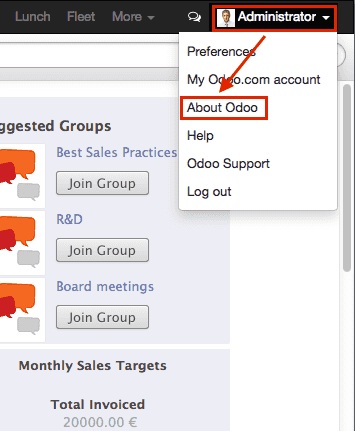
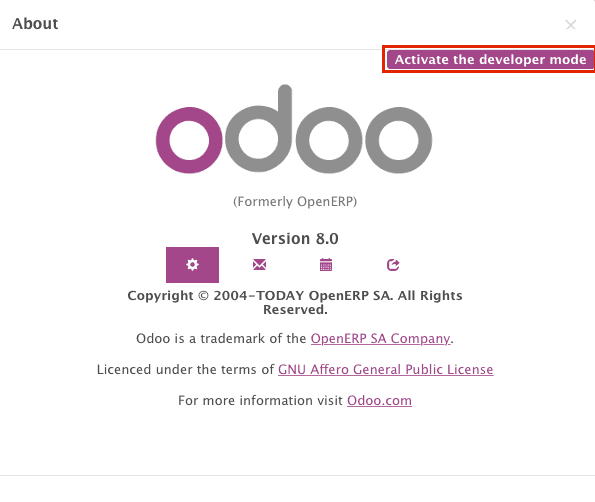
这将重新加载 Web 客户端并禁用优化,使开发和调试更加方便。
Odoo JavaScript 模块
JavaScript 没有内置的模块系统。因此,在不同文件中定义的变量会被混在一起,可能导致冲突。这催生了各种用于构建干净命名空间并限制命名冲突风险的模块模式。
Odoo 框架使用其中一种模式来定义 Web 插件中的模块,以便对代码进行命名空间划分并正确排序其加载顺序。
oepetstore/static/js/petstore.js 包含一个模块声明::
odoo.oepetstore = function(instance, local) {
    local.xxx = ...;
}
在 Odoo Web 中,模块被声明为设置在全局变量 odoo 上的函数。函数名称必须与插件名称相同(在本例中为 oepetstore ),以便框架可以找到它并自动初始化。
当 Web 客户端加载您的模块时,它会调用根函数并提供两个参数:
第一个参数是当前的 Odoo Web 客户端实例,它提供了访问 Odoo 定义的各种功能(翻译、网络服务)以及核心或其他模块定义的对象的能力。
第二个参数是由 Web 客户端自动创建的本地命名空间。那些需要从模块外部访问的对象和变量(无论是因为 Odoo Web 客户端需要调用它们,还是因为其他人可能希望自定义它们)应设置在此命名空间中。
类
与模块类似,且与大多数面向对象语言相反,JavaScript 并未内置 类1 ,尽管它提供了大致等效(尽管更底层且更冗长)的机制。
为了简化和提高开发者友好性,Odoo Web 提供了一个基于 John Resig 的 简单 JavaScript 继承 的类系统。
新类通过调用 odoo.web.Class() 的 extend() 方法来定义::
var MyClass = instance.web.Class.extend({
    say_hello: function() {
        console.log("hello");
    },
});
extend() 方法接受一个描述新类内容(方法和静态属性)的字典。在本例中,它将仅包含一个不带参数的 say_hello 方法。
类通过 new 操作符实例化::
var my_object = new MyClass();
my_object.say_hello();
// print "hello" in the console
实例的属性可以通过 this 访问::
var MyClass = instance.web.Class.extend({
    say_hello: function() {
        console.log("hello", this.name);
    },
});

var my_object = new MyClass();
my_object.name = "Bob";
my_object.say_hello();
// print "hello Bob" in the console
类可以通过定义一个 init() 方法来提供初始化器,以执行实例的初始设置。初始化器接收使用 new 操作符时传递的参数::
var MyClass = instance.web.Class.extend({
    init: function(name) {
        this.name = name;
    },
    say_hello: function() {
        console.log("hello", this.name);
    },
});

var my_object = new MyClass("Bob");
my_object.say_hello();
// print "hello Bob" in the console
还可以通过在父类上调用 extend() 来从现有的(用户定义的)类创建子类,就像对 Class() 创建子类一样::
var MySpanishClass = MyClass.extend({
    say_hello: function() {
        console.log("hola", this.name);
    },
});

var my_object = new MySpanishClass("Bob");
my_object.say_hello();
// print "hola Bob" in the console
当使用继承覆盖方法时,可以使用 this._super() 调用原始方法::
var MySpanishClass = MyClass.extend({
    say_hello: function() {
        this._super();
        console.log("translation in Spanish: hola", this.name);
    },
});

var my_object = new MySpanishClass("Bob");
my_object.say_hello();
// print "hello Bob \n translation in Spanish: hola Bob" in the console
警告
_super 不是一个标准方法,它会动态地设置为当前继承链中的下一个方法(如果有的话)。它仅在方法调用的 同步 部分中定义,在异步处理程序中使用(例如网络调用后或在 setTimeout 回调中),应保留对其值的引用,而不应通过 this 访问::
// broken, will generate an error
say_hello: function () {
    setTimeout(function () {
        this._super();
    }.bind(this), 0);
}

// correct
say_hello: function () {
    // don't forget .bind()
    var _super = this._super.bind(this);
    setTimeout(function () {
        _super();
    }.bind(this), 0);
}
小部件基础
Odoo Web 客户端捆绑了 jQuery 以便于 DOM 操作。它非常有用,并提供了比标准 W3C DOM2 更好的 API,但对于构建复杂应用程序来说并不足够,容易导致维护困难。
与面向对象的桌面 UI 工具包(例如 Qt、Cocoa 或 GTK)类似,Odoo Web 将特定组件负责页面的各个部分。在 Odoo Web 中,这些组件的基础是 Widget() 类,该类专门用于处理页面的某个部分并向用户显示信息。
您的第一个小部件
初始演示模块已经提供了一个基本的小部件::
local.HomePage = instance.Widget.extend({
    start: function() {
        console.log("pet store home page loaded");
    },
});
It extends Widget() and overrides the standard method
start(), which — much like the previous MyClass
— does little for now.
文件末尾的这一行::
instance.web.client_actions.add(
    'petstore.homepage', 'instance.oepetstore.HomePage');
将我们的基本小部件注册为客户端操作。客户端操作将在后面解释,目前这只是允许我们在选择 菜单时调用和显示我们小部件的功能。
警告
因为小部件将从我们的模块外部调用,Web 客户端需要其“全限定名”,而不是本地版本。
显示内容
小部件有许多方法和特性,但基础很简单:
设置小部件
格式化小部件的数据
显示小部件
HomePage 小部件已经有一个 start() 方法。该方法是小部件生命周期的一部分,当小部件插入页面时会自动调用。我们可以用它来显示一些内容。
所有小部件都有一个 $el ,它表示它们所负责的页面部分(作为 jQuery 对象)。小部件的内容应该插入到这里。默认情况下, $el 是一个空的 <div> 元素。
一个 <div> 元素如果没有内容(或者没有特定样式赋予它大小),通常对用户来说是不可见的,这就是为什么在启动 HomePage 时页面上没有显示任何内容的原因。
让我们使用 jQuery 向小部件的根元素添加一些内容::
local.HomePage = instance.Widget.extend({
    start: function() {
        this.$el.append("<div>Hello dear Odoo user!</div>");
    },
});
当您打开 时,该消息将会出现。
注解
要刷新加载到 Odoo Web 中的 JavaScript 代码,您需要重新加载页面。无需重启 Odoo 服务器。
HomePage 小部件由 Odoo Web 使用并自动管理。为了学习如何从头开始使用小部件,让我们创建一个新的小部件::
local.GreetingsWidget = instance.Widget.extend({
    start: function() {
        this.$el.append("<div>We are so happy to see you again in this menu!</div>");
    },
});
我们现在可以通过使用 GreetingsWidget 的 appendTo() 方法将其添加到 HomePage 中::
local.HomePage = instance.Widget.extend({
    start: function() {
        this.$el.append("<div>Hello dear Odoo user!</div>");
        var greeting = new local.GreetingsWidget(this);
        return greeting.appendTo(this.$el);
    },
});
HomePage首先将其自己的内容添加到其 DOM 根节点中然后
HomePage实例化GreetingsWidget最后,它告诉
GreetingsWidget在何处插入自身,并将其部分$el委托给GreetingsWidget。
当调用 appendTo() 方法时,它会要求小部件在指定位置插入自身并显示其内容。在调用 appendTo() 期间将调用 start() 方法。
为了查看显示界面下的情况,我们将使用浏览器的 DOM 探查器。但首先让我们稍微修改一下小部件,通过 为它们的根元素添加类 来更容易找到它们的位置::
local.HomePage = instance.Widget.extend({
    className: 'oe_petstore_homepage',
    ...
});
local.GreetingsWidget = instance.Widget.extend({
    className: 'oe_petstore_greetings',
    ...
});
如果您能找到 DOM 的相关部分(右键单击文本然后选择 检查元素 ),它应该如下所示:
<div class="oe_petstore_homepage">
    <div>Hello dear Odoo user!</div>
    <div class="oe_petstore_greetings">
        <div>We are so happy to see you again in this menu!</div>
    </div>
</div>
Which clearly shows the two <div> elements automatically created by
Widget(), because we added some classes on them.
我们还可以看到我们自己添加的两个包含消息的 div。
最后,请注意表示 GreetingsWidget 实例的 <div class="oe_petstore_greetings"> 元素位于表示 HomePage 实例的 <div class="oe_petstore_homepage"> 内部,因为我们将它附加到了其中。
小部件的父与子
在上一部分中,我们使用以下语法实例化了一个小部件::
new local.GreetingsWidget(this);
The first argument is this, which in that case was a HomePage
instance. This tells the widget being created which other widget is its
parent.
正如我们所见,小部件通常由另一个小部件插入到 DOM 中,并且位于该小部件的根元素 内部 。这意味着大多数小部件是另一个小部件的“一部分”,并为其存在。我们将容器称为 父级 ,将包含的小部件称为 子级 。
由于多种技术和概念上的原因,小部件需要知道谁是它的父级以及谁是它的子级。
getParent()可以用来获取小部件的父级::
local.GreetingsWidget = instance.Widget.extend({
    start: function() {
        console.log(this.getParent().$el );
        // will print "div.oe_petstore_homepage" in the console
    },
});
getChildren()可以用来获取其子级列表::
local.HomePage = instance.Widget.extend({
    start: function() {
        var greeting = new local.GreetingsWidget(this);
        greeting.appendTo(this.$el);
        console.log(this.getChildren()[0].$el);
        // will print "div.oe_petstore_greetings" in the console
    },
});
在覆盖小部件的 init() 方法时, 至关重要的是 将父级传递给 this._super() 调用,否则关系将无法正确设置::
local.GreetingsWidget = instance.Widget.extend({
    init: function(parent, name) {
        this._super(parent);
        this.name = name;
    },
});
最后,如果一个小部件没有父级(例如,因为它是应用程序的根小部件),可以提供 null 作为父级::
new local.GreetingsWidget(null);
销毁小部件
如果您可以向用户显示内容,那么也应该能够擦除它。这是通过 destroy() 方法完成的::
greeting.destroy();
当一个小部件被销毁时,它会首先对其所有子级调用 destroy() 。然后它会从 DOM 中删除自身。如果您在 init() 或 start() 中设置了必须显式清理的永久结构(因为垃圾回收器不会处理它们),您可以覆盖 destroy() 。
危险
when overriding destroy(), _super()
must always be called otherwise the widget and its children are not
correctly cleaned up leaving possible memory leaks and “phantom events”,
even if no error is displayed
QWeb 模板引擎
在上一节中,我们通过直接操作(和添加)它们的 DOM 来为小部件添加内容::
this.$el.append("<div>Hello dear Odoo user!</div>");
这允许生成和显示任何类型的内容,但在生成大量 DOM 时会变得笨拙(存在大量重复、引号问题等)。
像许多其他环境一样,Odoo 的解决方案是使用 模板引擎 。Odoo 的模板引擎称为 QWeb 模板 。
QWeb 是一种基于 XML 的模板语言,类似于 Genshi、Thymeleaf 或 Facelets 。它具有以下特点:
它完全用 JavaScript 实现,并在浏览器中渲染。
每个模板文件(XML 文件)包含多个模板。
It has special support in Odoo Web’s
Widget(), though it can be used outside of Odoo’s web client (and it’s possible to useWidget()without relying on QWeb)
注解
使用 QWeb 而不是现有的 JavaScript 模板引擎的原因在于其对已有(第三方)模板的可扩展性,这一点与 Odoo 的 视图 类似。
大多数 JavaScript 模板引擎是基于文本的,这排除了轻松进行结构扩展的可能性,而基于 XML 的模板引擎可以通过 XPath、CSS 和树形修改 DSL(甚至仅仅是 XSLT)进行通用修改。这种灵活性和可扩展性是 Odoo 的核心特性,失去它被认为是不可接受的。
使用 QWeb
首先,让我们在几乎为空的 oepetstore/static/src/xml/petstore.xml 文件中定义一个简单的 QWeb 模板:
<?xml version="1.0" encoding="UTF-8"?>
<templates xml:space="preserve">
    <t t-name="HomePageTemplate">
        <div style="background-color: red;">This is some simple HTML</div>
    </t>
</templates>
现在我们可以在 HomePage 小部件中使用这个模板。使用页面顶部定义的 QWeb 加载器变量,我们可以调用 XML 文件中定义的模板::
local.HomePage = instance.Widget.extend({
    start: function() {
        this.$el.append(QWeb.render("HomePageTemplate"));
    },
});
QWeb.render() 查找指定的模板,将其渲染为字符串并返回结果。
然而,由于 Widget() 对 QWeb 有特殊集成,模板可以通过其 template 属性直接设置在小部件上::
local.HomePage = instance.Widget.extend({
    template: "HomePageTemplate",
    start: function() {
        ...
    },
});
尽管结果看起来相似,但这两种用法之间有两个区别:
在第二种版本中,模板会在调用
start()之前被渲染。在第一种版本中,模板的内容被添加到小部件的根元素中,而在第二种版本中,模板的根元素直接 被设置为 小部件的根元素。这就是为什么“greetings”子小部件也会获得红色背景的原因。
警告
模板应该有一个单一的非 t 根元素,尤其是当它们被设置为小部件的 template 时。如果有多个“根元素”,结果将是未定义的(通常只会使用第一个根元素,其余的将被忽略)。
QWeb 上下文
QWeb 模板可以接收数据,并包含基本的显示逻辑。
For explicit calls to QWeb.render(), the template data is passed as
second parameter:
QWeb.render("HomePageTemplate", {name: "Klaus"});
模板修改为:
<t t-name="HomePageTemplate">
    <div>Hello <t t-esc="name"/></div>
</t>
将导致:
<div>Hello Klaus</div>
在使用 Widget() 集成时,无法向模板提供额外的数据。模板将被赋予一个单独的 widget 上下文变量,该变量引用在调用 start() 之前渲染的小部件(小部件的状态基本上是由 init() 设置的):
<t t-name="HomePageTemplate">
    <div>Hello <t t-esc="widget.name"/></div>
</t>
local.HomePage = instance.Widget.extend({
    template: "HomePageTemplate",
    init: function(parent) {
        this._super(parent);
        this.name = "Mordecai";
    },
    start: function() {
    },
});
结果:
<div>Hello Mordecai</div>
模板声明
我们已经了解了如何 渲染 QWeb 模板,现在让我们看看模板本身的语法。
QWeb 模板由常规 XML 和 QWeb 指令 组成。QWeb 指令通过以 t- 开头的 XML 属性声明。
The most basic directive is t-name, used to declare new templates in
a template file:
<templates>
    <t t-name="HomePageTemplate">
        <div>This is some simple HTML</div>
    </t>
</templates>
t-name 接受所定义模板的名称,并声明可以使用 QWeb.render() 调用它。它只能在模板文件的顶层使用。
转义
t-esc 指令可用于输出文本:
<div>Hello <t t-esc="name"/></div>
它接受一个 JavaScript 表达式,该表达式会被求值,然后结果将被 HTML 转义并插入到文档中。由于它是一个表达式,因此可以像上面那样直接提供变量名,或者提供更复杂的计算表达式:
<div><t t-esc="3+5"/></div>
或方法调用:
<div><t t-esc="name.toUpperCase()"/></div>
输出 HTML
要将 HTML 注入正在渲染的页面,请使用 t-raw 。与 t-esc 类似,它接受任意的 JavaScript 表达式作为参数,但不会执行 HTML 转义步骤。
<div><t t-raw="name.link(user_account)"/></div>
危险
t-raw 不得 用于可能包含未转义用户提供的内容的数据,因为这会导致 跨站脚本攻击 漏洞。
条件语句
QWeb can have conditional blocks using t-if. The directive takes an
arbitrary expression, if the expression is falsy (false, null, 0
or an empty string) the whole block is suppressed, otherwise it is displayed.
<div>
    <t t-if="true == true">
        true is true
    </t>
    <t t-if="true == false">
        true is not true
    </t>
</div>
注解
QWeb 没有“else”结构,可以通过使用第二个 t-if 并反转原始条件来实现。如果条件复杂或计算成本较高,可以将其存储在局部变量中。
迭代
要对列表进行迭代,请使用 t-foreach 和 t-as 。t-foreach 接受返回列表的表达式,而 t-as 接受一个变量名,用于在迭代期间绑定到每个项。
<div>
    <t t-foreach="names" t-as="name">
        <div>
            Hello <t t-esc="name"/>
        </div>
    </t>
</div>
注解
t-foreach 还可以用于数字和对象(字典)。
定义属性
QWeb 提供了两个相关的指令来定义计算属性:t-att-name 和 t-attf-name 。在这两种情况下, name 是要创建的属性名称(例如,t-att-id 在渲染后定义属性 id )。
t-att- 接受一个 JavaScript 表达式,其结果将设置为属性的值。当属性的值完全由计算得出时,它最有用:
<div>
    Input your name:
    <input type="text" t-att-value="defaultName"/>
</div>
t-attf- takes a format string. A format string is literal text with
interpolation blocks inside, an interpolation block is a javascript
expression between {{ and }}, which will be replaced by the result
of the expression. It is most useful for attributes which are partially
literal and partially computed such as a class:
<div t-attf-class="container {{ left ? 'text-left' : '' }} {{ extra_class }}">
    insert content here
</div>
调用其他模板
模板可以拆分为子模板(为了简单性、可维护性、可重用性或避免过多的标记嵌套)。
这是通过 t-call 指令完成的,它接受要渲染的模板名称:
<t t-name="A">
    <div class="i-am-a">
        <t t-call="B"/>
    </div>
</t>
<t t-name="B">
    <div class="i-am-b"/>
</t>
渲染 A 模板将导致:
<div class="i-am-a">
    <div class="i-am-b"/>
</div>
子模板继承其调用者的渲染上下文。
了解更多关于 QWeb 的内容
有关 QWeb 的参考,请参阅 QWeb 模板 。
练习
Exercise
在小部件中使用 QWeb
创建一个小部件,其构造函数除了 parent 外还接受两个参数:product_names 和 color 。
product_names应该是一个字符串数组,每个字符串表示一个产品的名称。color是一个包含 CSS 颜色格式的字符串(例如:黑色为#000000)。
小部件应将给定的产品名称逐个显示在单独的框中,每个框的背景颜色为 color 的值,并带有边框。您应该使用 QWeb 渲染 HTML。任何必要的 CSS 应放在 oepetstore/static/src/css/petstore.css 中。
在 HomePage 中使用该小部件,提供大约六个产品。
小部件辅助功能
Widget 的 jQuery 选择器
可以通过在小部件的 DOM 根上调用 find() 方法来选择小部件内的 DOM 元素::
this.$el.find("input.my_input")...
但由于这是一个常见操作, Widget() 提供了一个通过 $() 方法的等效快捷方式::
local.MyWidget = instance.Widget.extend({
    start: function() {
        this.$("input.my_input")...
    },
});
警告
除非绝对必要,否则不应使用全局 jQuery 函数 $() :对小部件根的选择是限定在小部件范围内的并且是局部的,而使用 $() 的选择是全局的,可能会匹配其他小部件和视图的部分内容,从而导致奇怪或危险的副作用。由于小部件通常只对其拥有的 DOM 部分起作用,因此没有理由进行全局选择。
更简单的 DOM 事件绑定
我们之前通过普通 jQuery 事件处理程序(例如 .click() 或 .change() )在小部件元素上绑定了 DOM 事件::
local.MyWidget = instance.Widget.extend({
    start: function() {
        var self = this;
        this.$(".my_button").click(function() {
            self.button_clicked();
        });
    },
    button_clicked: function() {
        ..
    },
});
虽然这可以工作,但它存在一些问题:
它相当冗长
它不支持在运行时替换小部件的根元素,因为绑定仅在运行
start()时执行(在小部件初始化期间)。它需要处理
this绑定问题
因此,小部件通过 events 提供了一种 DOM 事件绑定的快捷方式::
local.MyWidget = instance.Widget.extend({
    events: {
        "click .my_button": "button_clicked",
    },
    button_clicked: function() {
        ..
    }
});
events 是一个对象(映射),将事件映射到事件触发时要调用的函数或方法:
键是事件名称,可能通过 CSS 选择器进一步细化,在这种情况下,只有当事件发生在选定的子元素上时,函数或方法才会运行:
click将处理小部件内的所有点击,但click .my_button只会处理带有my_button类的元素中的点击。值是事件触发时要执行的操作
它可以是一个函数::
events: {
    'click': function (e) { /* code here */ }
}
或者是对象上的方法名称(见上面的示例)。
在任何情况下,
this都是小部件实例,而处理程序会接收到一个参数,即事件对应的 jQuery 事件对象 。
小部件事件与属性
事件
小部件提供了一个事件系统(与上述 DOM/jQuery 事件系统分开):一个小部件可以在自身上触发事件,其他小部件(或其自身)可以绑定并监听这些事件::
local.ConfirmWidget = instance.Widget.extend({
    events: {
        'click button.ok_button': function () {
            this.trigger('user_chose', true);
        },
        'click button.cancel_button': function () {
            this.trigger('user_chose', false);
        }
    },
    start: function() {
        this.$el.append("<div>Are you sure you want to perform this action?</div>" +
            "<button class='ok_button'>Ok</button>" +
            "<button class='cancel_button'>Cancel</button>");
    },
});
该小部件充当了门面,将用户输入(通过 DOM 事件)转换为可记录的内部事件,父小部件可以绑定到这些事件上。
trigger() 将触发事件的名称作为其第一个(必需的)参数,其他参数被视为事件数据并直接传递给监听器。
然后,我们可以通过实例化通用小部件并使用 on() 监听 user_chose 事件来设置父事件::
local.HomePage = instance.Widget.extend({
    start: function() {
        var widget = new local.ConfirmWidget(this);
        widget.on("user_chose", this, this.user_chose);
        widget.appendTo(this.$el);
    },
    user_chose: function(confirm) {
        if (confirm) {
            console.log("The user agreed to continue");
        } else {
            console.log("The user refused to continue");
        }
    },
});
on() 绑定一个函数,当由 event_name 标识的事件发生时调用。func 参数是要调用的函数,而 object 是该函数所属的对象(如果它是一个方法)。如果 trigger() 有额外参数,则绑定的函数会被调用时传入这些参数。示例::
start: function() {
    var widget = ...
    widget.on("my_event", this, this.my_event_triggered);
    widget.trigger("my_event", 1, 2, 3);
},
my_event_triggered: function(a, b, c) {
    console.log(a, b, c);
    // will print "1 2 3"
}
注解
在另一个小部件上触发事件通常不是一个好主意。这条规则的主要例外是 odoo.web.bus ,它专门用于在整个 Odoo Web 应用程序中广播任何小部件可能感兴趣的事件。
属性
属性与普通对象属性非常相似,因为它们允许在小部件实例上存储数据,但它们还有一个附加特性,即在设置时会触发事件::
start: function() {
    this.widget = ...
    this.widget.on("change:name", this, this.name_changed);
    this.widget.set("name", "Nicolas");
},
name_changed: function() {
    console.log("The new value of the property 'name' is", this.widget.get("name"));
}
set()设置属性的值,并触发change:propname(其中 propname 是传递给set()的第一个参数中的属性名称)和change。get()检索属性的值。
练习
Exercise
小部件属性与事件
Create a widget ColorInputWidget that will display 3 <input
type="text">. Each of these <input> is dedicated to type a
hexadecimal number from 00 to FF. When any of these <input> is
modified by the user the widget must query the content of the three
<input>, concatenate their values to have a complete CSS color code
(ie: #00FF00) and put the result in a property named color. Please
note the jQuery change() event that you can bind on any HTML
<input> element and the val() method that can query the current
value of that <input> could be useful to you for this exercise.
然后,修改 HomePage 小部件以实例化 ColorInputWidget 并显示它。HomePage 小部件还应显示一个空矩形。该矩形必须始终(在任何时候)具有与 ColorInputWidget 实例中的 color 属性相同的背景颜色。
使用 QWeb 生成所有 HTML。
修改现有小部件和类
Odoo Web 框架的类系统允许使用 include() 方法直接修改现有类::
var TestClass = instance.web.Class.extend({
testMethod: function() {
return "hello";
},
});
TestClass.include({
testMethod: function() {
return this._super() + " world";
},
});
console.log(new TestClass().testMethod());
// will print "hello world"
该系统类似于继承机制,不同之处在于它会就地修改目标类,而不是创建一个新类。
在这种情况下,this._super() 将调用被替换/重新定义的方法的原始实现。如果该类已经包含子类,则子类中所有对 this._super() 的调用都会调用在调用 include() 时定义的新实现。即使某些类实例(或其任何子类的实例)是在调用 include() 之前创建的,此机制仍然有效。
翻译
在 Python 和 JavaScript 代码中翻译文本的过程非常相似。您可能已经注意到 petstore.js 文件开头的这些行::
var _t = instance.web._t,
_lt = instance.web._lt;
这些行仅用于在当前 JavaScript 模块中导入翻译函数。它们的使用方式如下::
this.$el.text(_t("Hello user!"));
在 Odoo 中,翻译文件是通过扫描源代码自动生成的。所有调用特定函数的代码片段都会被检测到,并将其内容添加到翻译文件中,然后发送给翻译人员。在 Python 中,该函数是 _() 。在 JavaScript 中,该函数是 _t() (以及 _lt() )。
_t() 将返回为其提供的文本定义的翻译。如果没有为该文本定义翻译,则返回原始文本。
注解
要在可翻译字符串中注入用户提供的值,建议在翻译之后使用 _.str.sprintf 并使用命名参数::
this.$el.text(_.str.sprintf(
_t("Hello, %(user)s!"), {
user: "Ed"
}));
这使可翻译字符串对翻译人员来说更具可读性,并赋予他们重新排序或忽略参数的更多灵活性。
_lt() (“延迟翻译”)类似但稍微复杂一些:它不会立即翻译其参数,而是返回一个对象,当该对象转换为字符串时,将执行翻译。
它用于在翻译系统初始化之前定义可翻译术语,例如类属性(因为模块会在用户语言配置和翻译下载之前加载)。
与 Odoo 服务器通信
调用模型
大多数 Odoo 操作涉及与实现业务逻辑的 模型 进行通信,这些模型随后(可能)会与某些存储引擎(通常是 PostgreSQL)交互。
尽管 jQuery 提供了 $.ajax 函数用于网络交互,但与 Odoo 通信需要额外的元数据,在每次调用前设置这些元数据既冗长又容易出错。因此,Odoo Web 提供了更高层次的通信原语。
为了演示这一点,文件 petstore.py 已经包含了一个带有示例方法的小型模型:
class message_of_the_day(models.Model):
_name = "oepetstore.message_of_the_day"
@api.model
def my_method(self):
return {"hello": "world"}
message = fields.Text(),
color = fields.Char(size=20),
这声明了一个包含两个字段的模型,以及一个返回字面量字典的方法 my_method() 。
以下是一个调用 my_method() 并显示结果的示例小部件::
local.HomePage = instance.Widget.extend({
start: function() {
var self = this;
var model = new instance.web.Model("oepetstore.message_of_the_day");
model.call("my_method", {context: new instance.web.CompoundContext()}).then(function(result) {
self.$el.append("<div>Hello " + result["hello"] + "</div>");
// will show "Hello world" to the user
});
},
});
用于调用 Odoo 模型的类是 odoo.Model() 。它以 Odoo 模型的名称作为第一个参数实例化(此处为 oepetstore.message_of_the_day )。
call() 可用于调用 Odoo 模型的任何(公共)方法。它接受以下位置参数:
name要调用的方法名称,这里是
my_method。args提供给方法的 位置参数 数组。由于示例没有需要提供的位置参数,因此未提供
args参数。以下是带有位置参数的另一个示例:
@api.model def my_method2(self, a, b, c): ...
model.call("my_method", [1, 2, 3], ... // with this a=1, b=2 and c=3
kwargs传递的 关键字参数 映射。示例提供了一个名为
context的参数。@api.model def my_method2(self, a, b, c): ...
model.call("my_method", [], {a: 1, b: 2, c: 3, ... // with this a=1, b=2 and c=3
call() 返回一个延迟对象,其解析值为模型方法返回的第一个参数。
复合上下文
上一节使用了一个在方法调用中未解释的 context 参数::
model.call("my_method", {context: new instance.web.CompoundContext()})
上下文就像一个“神奇”的参数,Web 客户端在调用方法时总会将其传递给服务器。上下文是一个包含多个键的字典。其中一个最重要的键是用户的语言,服务器用它来翻译应用程序的所有消息。另一个键是用户的时区,如果 Odoo 被不同国家的人使用,则用于正确计算日期和时间。
该 argument 在所有方法中都是必需的,否则可能会发生不好的事情(例如应用程序无法正确翻译)。因此,在调用模型的方法时,您应始终提供该参数。实现这一目标的方法是使用 odoo.web.CompoundContext() 。
CompoundContext() 是一个用于将用户的上下文(包括语言、时区等)传递给服务器并添加新键到上下文中的类(某些模型的方法会使用添加到上下文中的任意键)。它通过向其构造函数传递任意数量的字典或其他 CompoundContext() 实例来创建。在发送到服务器之前,它会合并所有这些上下文。
model.call("my_method", {context: new instance.web.CompoundContext({'new_key': 'key_value'})})
@api.model
def my_method(self):
print(self.env.context)
// will print: {'lang': 'en_US', 'new_key': 'key_value', 'tz': 'Europe/Brussels', 'uid': 1}
可以看到参数 context 中的字典包含一些与当前用户在 Odoo 中的配置相关的键,以及在实例化 CompoundContext() 时添加的 new_key 键。
查询
虽然 call() 足以满足与 Odoo 模型的任何交互,但 Odoo Web 提供了一个辅助工具,可以更简单和清晰地查询模型(基于各种条件获取记录):query() ,它是 search() 和 read() 的常用组合的快捷方式。它提供了更清晰的语法来搜索和读取模型::
model.query(['name', 'login', 'user_email', 'signature'])
.filter([['active', '=', true], ['company_id', '=', main_company]])
.limit(15)
.all().then(function (users) {
// do work with users records
});
对比::
model.call('search', [['active', '=', true], ['company_id', '=', main_company]], {limit: 15})
.then(function (ids) {
return model.call('read', [ids, ['name', 'login', 'user_email', 'signature']]);
})
.then(function (users) {
// do work with users records
});
query()接受一个可选的字段列表作为参数(如果没有提供字段,则会获取模型的所有字段)。它返回一个odoo.web.Query()对象,在执行前可以进一步自定义。Query()表示正在构建的查询。它是不可变的,用于自定义查询的方法实际上会返回一个修改后的副本,因此可以同时使用原始版本和新版本。有关自定义选项,请参阅Query()。
当查询设置完成后,只需调用 all() 来执行它,并返回其结果的延迟对象。结果与 read() 的结果相同,是一个字典数组,每个字典表示一个请求的记录,每个请求的字段作为字典的键。
练习
Exercise
每日消息
创建一个 MessageOfTheDay 小部件,显示 oepetstore.message_of_the_day 模型的最后一条记录。小部件应在显示时立即获取其记录。
在宠物商店主页上显示该小部件。
Exercise
宠物玩具列表
创建一个 PetToysList 小部件,显示 5 个玩具(使用它们的名称和图片)。
宠物玩具并未存储在新模型中,而是存储在 product.product 中,使用特殊类别 Pet Toys 。您可以通过 查看预生成的玩具并添加新玩具。您可能需要探索 product.product 以创建正确的域来仅选择宠物玩具。
在 Odoo 中,图像通常存储在以 base64 编码的常规字段中,HTML 支持直接从 base64 显示图像,使用 <img src="data:mime_type;base64,base64_image_data"/> 。
PetToysList 小部件应显示在主页上,位于 MessageOfTheDay 小部件的右侧。您需要使用 CSS 进行一些布局调整以实现此效果。
现有的 Web 组件
动作管理器
在 Odoo 中,许多操作都从一个 动作 开始:打开菜单项(到视图)、打印报告等。
动作是描述客户端应如何响应内容激活的数据片段。动作可以被存储(并通过模型读取),也可以即时生成(由客户端的 JavaScript 代码本地生成,或由模型的方法远程生成)。
在 Odoo Web 中,负责处理和响应这些动作的组件是 动作管理器 。
使用动作管理器
可以通过 JavaScript 代码显式调用动作管理器,方法是创建一个描述正确类型 动作 的字典,并将其传递给动作管理器实例。
do_action() 是 Widget() 的快捷方式,用于查找“当前”动作管理器并执行动作::
instance.web.TestWidget = instance.Widget.extend({
dispatch_to_new_action: function() {
this.do_action({
type: 'ir.actions.act_window',
res_model: "product.product",
res_id: 1,
views: [[false, 'form']],
target: 'current',
context: {},
});
},
});
最常见的动作 type 是 ir.actions.act_window ,它为模型提供视图(以多种方式显示模型)。其最常见的属性包括:
res_model在视图中显示的模型
res_id(可选)对于表单视图,
res_model中的预选记录viewsLists the views available through the action. A list of
[view_id, view_type],view_idcan either be the database identifier of a view of the right type, orfalseto use the view by default for the specified type. View types can not be present multiple times. The action will open the first view of the list by default.target可以是
current``(默认值),它会用该动作替换 Web 客户端的“内容”部分;或者是 ``new,在对话框中打开该动作。context在动作中使用的额外上下文数据。
Exercise
跳转到产品
修改 PetToysList 组件,使得点击某个玩具时,主页会被替换为该玩具的表单视图。
客户端动作
在本指南中,我们使用了一个简单的 HomePage 小部件,当选择正确的菜单项时,Web 客户端会自动启动它。但 Odoo Web 是如何知道要启动这个小部件的呢?因为该小部件被注册为一个 客户端动作 。
客户端动作(顾名思义)是一种几乎完全在客户端定义的动作类型,在 Odoo Web 中由 JavaScript 实现。服务器仅发送一个动作标签(任意名称),并可选地添加一些参数,除此之外, 所有内容 都由自定义的客户端代码处理。
我们的小部件通过以下方式注册为客户端动作的处理器::
instance.web.client_actions.add('petstore.homepage', 'instance.oepetstore.HomePage');
instance.web.client_actions 是一个 Registry() ,当需要执行某个客户端动作时,动作管理器会在其中查找客户端动作处理器。 add() 的第一个参数是客户端动作的名称(标签),第二个参数是从 Odoo Web 客户端根路径到小部件的路径。
当需要执行客户端动作时,动作管理器会在注册表中查找其标签,沿着指定路径找到并在最后显示找到的小部件。
注解
客户端动作处理器也可以是一个常规函数,在这种情况下,它会被调用,其结果(如果有)将被解释为下一个要执行的动作。
在服务器端,我们只是简单地定义了一个 ir.actions.client 动作:
<record id="action_home_page" model="ir.actions.client">
<field name="tag">petstore.homepage</field>
</record>
以及一个打开该动作的菜单:
<menuitem id="home_page_petstore_menu" parent="petstore_menu"
name="Home Page" action="action_home_page"/>
视图架构
Odoo Web 的大部分用途(和复杂性)都在于视图。每种视图类型都是在客户端显示模型的一种方式。
视图管理器
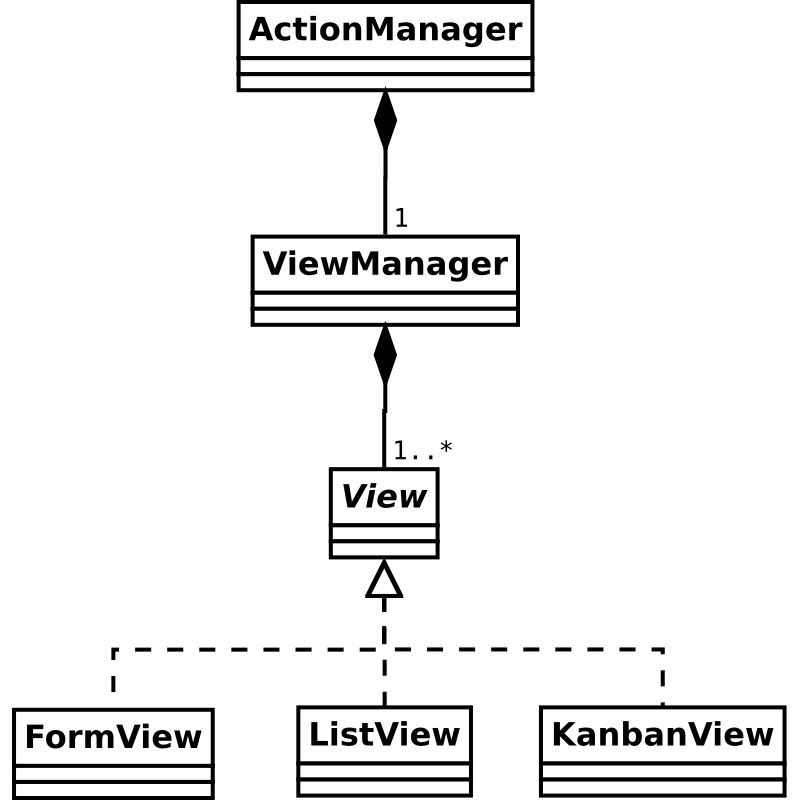
When an ActionManager instance receive an action of type
ir.actions.act_window, it delegates the synchronization and handling of
the views themselves to a view manager, which will then set up one or
multiple views depending on the original action’s requirements:
视图
大多数 Odoo 视图 是通过 odoo.web.View() 的子类实现的,它提供了一些通用的基本结构,用于处理事件和显示模型信息。
搜索视图 被主 Odoo 框架视为一种视图类型,但由 Web 客户端单独处理(因为它是一个更固定的组件,并且可以与其他视图交互,而普通视图则不会这样做)。
视图负责加载自己的描述性 XML(使用 fields_view_get )以及它所需的任何其他数据源。为此,视图提供了一个可选的视图标识符,作为 view_id 属性。
视图还提供了一个 DataSet() 实例,其中包含大多数必要的模型信息(模型名称以及可能的各种记录 ID)。
Views may also want to handle search queries by overriding
do_search(), and updating their
DataSet() as necessary.
表单视图字段
一个常见的需求是扩展 Web 表单视图以添加新的字段显示方式。
所有内置字段都有默认的显示实现,但可能需要一个新的表单小部件来正确处理新字段类型(例如 GIS 字段),或者为现有字段类型提供新的表示形式和交互方式(例如,验证应包含电子邮件地址的 Char 字段,并将其显示为电子邮件链接)。
要显式指定用于显示字段的表单小部件,只需在视图的 XML 描述中使用 widget 属性:
<field name="contact_mail" widget="email"/>
注解
同一个小部件会同时用于表单视图的“查看”(只读)模式和“编辑”模式,因此无法在一个模式中使用一个小部件而在另一个模式中使用另一个小部件。
并且同一字段(名称)不能在同一表单中多次使用。
一个小部件可能会忽略表单视图的当前模式,在查看和编辑模式下保持相同。
字段在表单视图读取其 XML 描述并构建相应的 HTML 表示后被实例化。之后,表单视图将通过一些方法与字段对象进行通信。这些方法由 FieldInterface 接口定义。几乎所有字段都继承了 AbstractField 抽象类。该类定义了一些需要由大多数字段实现的默认机制。
以下是字段类的一些职责:
字段类必须显示字段值并允许用户对其进行编辑。
它必须正确实现 Odoo 中所有字段可用的 3 个字段属性。
AbstractField类已经实现了一个动态计算这些属性值的算法(它们可以随时更改,因为它们的值会随着其他字段的值而变化)。它们的值存储在 小部件属性 中(小部件属性已在本指南前面部分解释过)。每个字段类都有责任检查这些小部件属性,并根据其值动态调整。以下是这些属性的描述:required:字段在保存之前必须有值。如果required为true且字段没有值,则字段的is_valid()方法必须返回false。invisible: When this istrue, the field must be invisible. TheAbstractFieldclass already has a basic implementation of this behavior that fits most fields.readonly: Whentrue, the field must not be editable by the user. Most fields in Odoo have a completely different behavior depending on the value ofreadonly. As example, theFieldChardisplays an HTML<input>when it is editable and simply displays the text when it is read-only. This also means it has much more code it would need to implement only one behavior, but this is necessary to ensure a good user experience.
Fields have two methods,
set_value()andget_value(), which are called by the form view to give it the value to display and get back the new value entered by the user. These methods must be able to handle the value as given by the Odoo server when aread()is performed on a model and give back a valid value for awrite(). Remember that the JavaScript/Python data types used to represent the values given byread()and given towrite()is not necessarily the same in Odoo. As example, when you read a many2one, it is always a tuple whose first value is the id of the pointed record and the second one is the name get (ie:(15, "Agrolait")). But when you write a many2one it must be a single integer, not a tuple anymore.AbstractFieldhas a default implementation of these methods that works well for simple data type and set a widget property namedvalue.
请注意,为了更好地理解如何实现字段,强烈建议您直接查看 Odoo Web 客户端代码中的 FieldInterface 接口和 AbstractField 类的定义。
创建一种新的字段类型
在这一部分中,我们将解释如何创建一种新的字段类型。这里的示例将重新实现 FieldChar 类,并逐步解释每个部分。
简单的只读字段
这是一个仅显示文本的初始实现。用户将无法修改字段的内容。
local.FieldChar2 = instance.web.form.AbstractField.extend({
init: function() {
this._super.apply(this, arguments);
this.set("value", "");
},
render_value: function() {
this.$el.text(this.get("value"));
},
});
instance.web.form.widgets.add('char2', 'instance.oepetstore.FieldChar2');
在此示例中,我们声明了一个名为 FieldChar2 的类,它继承自 AbstractField 。我们还将该类注册到注册表 instance.web.form.widgets 中,键为 char2 。这将允许我们在任何表单视图中通过在视图的 XML 声明中的 <field/> 标签中指定 widget="char2" 来使用这个新字段。
在此示例中,我们定义了一个方法:render_value() 。它的作用是显示小部件属性 value 。这是 AbstractField 类定义的两个工具之一。如前所述,表单视图会调用字段的 set_value() 方法来设置要显示的值。该方法在 AbstractField 中已经有了默认实现,只是简单地设置小部件属性 value 。AbstractField 还会监听自身的 change:value 事件,并在事件发生时调用 render_value() 。因此,render_value() 是一个方便的方法,可以在子类中实现,以便在字段值每次发生变化时执行某些操作。
在 init() 方法中,我们还定义了字段的默认值(如果表单视图未指定)。在这里,我们假设 char 字段的默认值应为空字符串。
可读写字段
只读字段(仅显示内容而不允许用户修改)可能很有用,但 Odoo 中的大多数字段也允许编辑。这使得字段类更加复杂,主要是因为字段需要同时处理可编辑和不可编辑模式,而这些模式通常完全不同(出于设计和可用性目的),并且字段必须能够随时在模式之间切换。
为了知道当前字段应该处于哪种模式,AbstractField 类设置了一个名为 effective_readonly 的小部件属性。字段应监听该小部件属性的变化,并相应地显示正确的模式。例如::
local.FieldChar2 = instance.web.form.AbstractField.extend({
init: function() {
this._super.apply(this, arguments);
this.set("value", "");
},
start: function() {
this.on("change:effective_readonly", this, function() {
this.display_field();
this.render_value();
});
this.display_field();
return this._super();
},
display_field: function() {
var self = this;
this.$el.html(QWeb.render("FieldChar2", {widget: this}));
if (! this.get("effective_readonly")) {
this.$("input").change(function() {
self.internal_set_value(self.$("input").val());
});
}
},
render_value: function() {
if (this.get("effective_readonly")) {
this.$el.text(this.get("value"));
} else {
this.$("input").val(this.get("value"));
}
},
});
instance.web.form.widgets.add('char2', 'instance.oepetstore.FieldChar2');
<t t-name="FieldChar2">
<div class="oe_field_char2">
<t t-if="! widget.get('effective_readonly')">
<input type="text"></input>
</t>
</div>
</t>
In the start() method (which is called immediately after a widget has been
appended to the DOM), we bind on the event change:effective_readonly. That
allows us to redisplay the field each time the widget property
effective_readonly changes. This event handler will call
display_field(), which is also called directly in start(). This
display_field() was created specifically for this field, it’s not a method
defined in AbstractField or any other class. We can use this method
to display the content of the field depending on the current mode.
从现在开始,该字段的设计是典型的,只是需要进行大量验证以了解 effective_readonly 属性的状态:
在用于显示小部件内容的 QWeb 模板中,如果处于读写模式,则显示一个
<input type="text" />;而在只读模式下则不显示任何特定内容。在
display_field()方法中,我们需要绑定到<input type="text" />的change事件,以了解用户何时更改了值。当这种情况发生时,我们使用字段的新值调用internal_set_value()方法。这是AbstractField类提供的一个便捷方法。该方法会在value属性中设置一个新值,但不会触发对render_value()的调用(这是不必要的,因为<input type="text" />已经包含正确的值)。In
render_value(), we use a completely different code to display the value of the field depending if we are in read-only or in read-write mode.
Exercise
创建颜色字段
创建一个 FieldColor 类。该字段的值应是一个包含颜色代码的字符串,类似于 CSS 中使用的颜色代码(例如,红色为 #FF0000 )。在只读模式下,此颜色字段应显示一个小块,其颜色与字段的值相对应。在读写模式下,您应显示一个 <input type="color" /> 。这种类型的 <input /> 是 HTML5 组件,在所有浏览器中都不支持,但在 Google Chrome 中表现良好。因此,作为练习是可以使用的。
您可以在 message_of_the_day 模型的表单视图中为名为 color 的字段使用该小部件。作为额外奖励,您可以更改本指南前一部分创建的 MessageOfTheDay 小部件,以使用 color 字段中指定的背景颜色显示当天的消息。
表单视图自定义小部件
表单字段用于编辑单个字段,并且与字段本身紧密相关。由于这可能会受到限制,还可以创建 表单小部件 ,它们没有那么多限制,并且与特定生命周期的关联较少。
可以通过 widget 标签将自定义表单小部件添加到表单视图中:
<widget type="xxx" />
这种类型的小部件将根据 XML 定义在 HTML 创建期间由表单视图简单地创建。它们与字段有一些共同属性(例如 effective_readonly 属性),但它们没有明确分配给某个字段。因此,它们没有像 get_value() 和 set_value() 这样的方法。它们必须继承自 FormWidget 抽象类。
表单小部件可以通过监听字段的变化并获取或更改其值来与表单字段交互。它们可以通过其 field_manager 属性访问表单字段::
local.WidgetMultiplication = instance.web.form.FormWidget.extend({
    start: function() {
        this._super();
        this.field_manager.on("field_changed:integer_a", this, this.display_result);
        this.field_manager.on("field_changed:integer_b", this, this.display_result);
        this.display_result();
    },
    display_result: function() {
        var result = this.field_manager.get_field_value("integer_a") *
                     this.field_manager.get_field_value("integer_b");
        this.$el.text("a*b = " + result);
    }
});

instance.web.form.custom_widgets.add('multiplication', 'instance.oepetstore.WidgetMultiplication');
FormWidget is generally the
FormView() itself, but features used from it should
be limited to those defined by FieldManagerMixin(),
the most useful being:
get_field_value(field_name)(),它返回字段的值。set_values(values)()设置多个字段值,接受一个{field_name: value_to_set}的映射。任何时候名为
field_name的字段值发生变化时,都会触发事件field_changed:field_name。
Exercise
在 Google 地图上显示坐标
向 product.product 添加两个字段,分别存储纬度和经度,然后创建一个新的表单小部件,用于在地图上显示产品的原产地的纬度和经度。
要显示地图,请使用 Google 地图嵌入:
<iframe width="400" height="300" src="https://maps.google.com/?ie=UTF8&ll=XXX,YYY&output=embed">
</iframe>
其中 XXX 应替换为纬度,YYY 替换为经度。
在产品表单视图的新笔记本页面中显示这两个位置字段以及使用它们的地图小部件。
Exercise
获取当前坐标
添加一个按钮,将产品的坐标重置为用户的位置,您可以使用 JavaScript 地理定位 API 获取这些坐标。
现在我们希望显示一个额外的按钮,以自动将坐标设置为当前用户的位置。
要获取用户的坐标,一种简单的方法是使用地理定位 JavaScript API。请参阅在线文档以了解如何使用它 。
另请注意,当表单视图处于只读模式时,用户不应能够点击该按钮。因此,此自定义小部件应正确处理 effective_readonly 属性,就像任何字段一样。一种实现方法是在 effective_readonly 为 true 时使按钮消失。