
RST 指南与速查表
一般指南
在为文档做出贡献时,请遵循以下 RST 指南,以帮助保持与其余文档的一致性,并简化团队的审查流程:
格式化
使用特定的格式化来提高清晰度和可读性。例如,对菜单路径使用 菜单选择 ,对其他用户界面元素(如字段、按钮和选项)使用 GUI 元素 ,对注释使用 注意 ,对示例使用 示例 等。
注解
在不同的块元素(如段落、列表和指令)之间添加一个空行,以确保正确的渲染和格式化。
缩进
仅使用空格(永远不要使用制表符)。
在缩进行的开头使用足够多的空格,使其与上一行标记的第一个字符对齐。通常这意味着三个空格,但例如对于项目符号列表,您只需要两个空格。
Example
第一个 : 位于 i 下方(三个空格):
.. image:: media/example.png
   :alt: example
:titlesonly: 和页面引用从 t 下方(三个空格)开始:
.. toctree::
   :titlesonly:

   payables/supplier_bills
   payables/pay
续行从 “Invoice” 的 I 下方(两个空格)继续:
- Invoice on ordered quantity: invoice the full order as soon as the sales order is confirmed.
- Invoice on delivered quantity: invoice on what was delivered even if it is a partial
  delivery.
100 字符限制
在 RST 中,可以在不强制在渲染出的 HTML 上换行的情况下手动折行。请利用这一特性,编写 最多 100 个字符一行 的行。不要在行末留下尾随空白作为分隔单词的手段。
小技巧
在任何空格处折行都是安全的,即使位于
:menuselection:和:doc:等标记内部也是如此。某些外部超链接可能会超过 100 个字符,但将其保留在一行上是可以接受的。
大多数 IDEs 都提供设置,用于在指定的字符限制处自动换行或显示视觉引导线。
标题
对于每一条格式化行(例如 ===),写入的符号(=)数量应与标题中的字符数相同。使用以下符号来格式化标题:
标题大小 |
格式化 |
|---|---|
H1 |
=======
Heading
=======
|
H2 |
Heading
=======
|
H3 |
Heading
-------
|
H4 |
Heading
~~~~~~~
|
H5 |
Heading
*******
|
H6 |
Heading
^^^^^^^
|
重要
每个文档必须有且仅有一个 H1 标题 。
标记
强调(斜体)
用于强调文本的一部分。该文本将以斜体显示。
在保存表单 之前 填写信息。 |
Fill out the information *before* saving the form.
|
强强调(粗体)
用于强调文本的一部分。该文本将以粗体显示。
子域 是另一个域的一部分的域。 |
A **subdomain** is a domain that is a part of another domain.
|
技术术语(字面量)
用于书写技术术语或要插入的特定值。该文本将以字面量形式显示。
插入打印机的 IP 地址,例如 |
Insert the IP address of your printer, for example, `192.168.1.25`.
|
定义
使用 dfn 标记来定义一个术语。
文档用 RST 编写,并需要构建( 转换为 HTML )以实现良好的显示效果。 |
The documentation is written in RST and needs to be built (:dfn:`converted to HTML`) to
display nicely.
|
缩写
使用 abbr 标记书写自定义缩写,该缩写会以工具提示形式显示。
Odoo 使用 OCR 和人工智能技术来识别文档的内容。 |
Odoo uses :abbr:`OCR (optical character recognition)` and artificial intelligence
technologies to recognize the content of the documents.
|
小技巧
对于反复出现的缩写,请使用 替换定义。
GUI 元素
使用 guilabel 标记来标识用户界面中的任何文本,例如标签。
更新您的凭据,然后单击 保存 。 |
Update your credentials, then click on :guilabel:`Save`.
|
注解
在提及概念或通用术语时,请避免使用 guilabel 标记。
Example
- 良好示例:要创建贷项通知,请前往 ,打开发票并点击 贷项通知 。
- 不良示例:要创建 贷项通知 ,请前往 ,打开 发票 并点击 贷项通知 。
菜单选择
使用 menuselection 标记引导用户完成一系列菜单,从应用程序名称开始。
要查看销售业绩,请转到 。 |
To review sales performance, go to :menuselection:`Sales --> Reporting --> Dashboard`.
|
注解
仅在 menuselection 标记中包含实际的菜单项:
对于其他用户界面元素(例如按钮和部分标题),请使用 GUI 元素 标记:
To configure the bill control policy, navigate to :menuselection:`Purchase --> Configuration
--> Settings`, and scroll down to the :guilabel:`Invoicing` section. Under :guilabel:`Bill
Control`, select either :guilabel:`Ordered quantities` or :guilabel:`Received quantities`.
不要包含菜单部分名称。例如,在下图中,
Journals不应包含在菜单路径 中: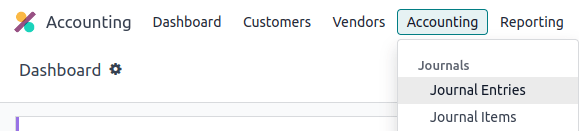
文件
使用 file 标记来指示文件路径或名称。
使用存储库根目录中的 |
Create redirections using the :file:`redirects.txt` file found at the root of the
repository.
|
命令
使用 command 标记突出显示命令。
运行命令 make clean html 以删除现有的已构建文件并将文档构建为 HTML。 |
Run the command :command:`make clean html` to delete existing built files and build the
documentation to HTML.
|
图标
使用 icon 标记来添加图标的类名。Odoo 中使用三种图标集:FontAwesome4 (fa-*)、Odoo UI (oi-*) 和 Odoo Spreadsheet (os-*) 图标。
图标之后请紧跟其 tooltip(尽可能)或以 GUI 元素 形式将其名称放在括号中作为描述符,除非其后紧跟一个 UI 元素。
图表视图由 (Graph) 图标表示。
透视视图由 (Pivot) 图标表示。
在电子表格的右上角点击 Filters。
|
| The graph view is represented by the :icon:`fa-area-chart` (:guilabel:`Graph`) icon.
| The pivot view is represented by the :icon:`oi-view-pivot` (:guilabel:`Pivot`) icon.
| Click :icon:`os-global-filters` :guilabel:`Filters` at the top right of the spreadsheet.
|
列表
项目符号列表
|
- This is a bulleted list.
- It has two items, the second
  item uses two lines.
|
编号列表
|
#. This is a numbered list.
#. Numbering is automatic.
|
|
a. Use this format to start the numbering with a different marker or a number other than
   one.
#. The numbering is automatic from here.
|
小技巧
为了提高代码的弹性,建议使用 #. 自动生成编号的列表,而不是手动指定 1. 、 2. 等。
嵌套列表
小技巧
在列表中的嵌套元素之前添加一个空行。
正确缩进 嵌套列表,使子项与其父项对齐。
|
- This is the first item of a bulleted list.

  #. It has a nested numbered list
  #. with two items.
|
超链接
外部超链接
外部超链接是指向 URL 的带自定义标签的链接。它们遵循以下语法: `标签 <URL>`_ 。
重要
在目标为另一个文档页面时,请使用 文档页面超链接 。
例如, 这是指向 Odoo 网站的外部超链接 。 |
For instance, `this is an external hyperlink to Odoo's website <https://www.odoo.com>`_.
|
别名
外部超链接别名允许为外部超链接创建快捷方式。定义语法如下: .. _target: URL 。根据使用情况,有两种引用方式:
target_创建一个以目标名称为标签、URL 为引用的超链接。注意_被移到目标之后。`label <target_>`_标签替换目标名称,目标被替换为 URL。
.. _proof-of-concept: https://en.wikipedia.org/wiki/Proof_of_concept

   A proof-of-concept_ is a simplified version, a prototype of what is expected to agree on
   the main lines of expected changes. `PoC <proof-of-concept_>`_ is a common abbreviation.
|
内部文档链接
重要
在对章节标题或超链接目标进行重构(在不添加新内容的情况下进行改进)时,务必确保不会破坏指向这些目标的任何超链接引用,或相应地进行更新。
相对链接
当引用的 内部文档页面 或 文件 与当前页面不在同一目录时,请使用*相对文件路径*而非*绝对文件路径*。这可确保即使在版本更新、文件夹名称更改和目录结构重组后,链接仍然有效。
绝对文件路径表示从根目录到目标位置的路径。相对文件路径使用智能符号(例如 ../ 表示父文件夹)来指示目标相对于源文档的位置。
Example
注解
以下示例的目的是说明绝对链接和相对链接之间的区别。引用文档页面时,请始终使用 文档页面超链接 。
给定以下源文件树::
documentation
├── content
│   └── applications
│   │   └── sales
│   │   │   └── sales
│   │   │   │   └── products_prices
│   │   │   │   │   └── products
│   │   │   │   │   │   └── import.rst
│   │   │   │   │   │   └── variants.rst
│   │   │   │   │   └── prices.rst
可以从 import.rst 引用 prices.rst 和 variants.rst ,如下所示:
绝对路径:
documentation/content/applications/sales/sales/products_prices/prices.rstdocumentation/content/applications/sales/sales/products_prices/products/variants.rst
相对路径:
../prices.rstvariants.rst
文档页面超链接
doc 标记可通过相对文件路径引用文件树中任意位置的文档页面。doc 标记有两种用法:
:doc:`path_to_doc_page`创建一个以页面标题为标签的文档页面超链接。:doc:`label <path_to_doc_page>`创建一个以给定标签为标签的文档页面超链接。
Please refer to the :doc:`Accounting documentation <../../../applications/finance/accounting>`
to learn more about :doc:`../../../applications/finance/accounting/customer_invoices`.
|
重要
自定义锚点
自定义锚点的语法与 外部超链接别名 相同,但不包含任何 URL。它们通过将目标作为锚点来引用 RST 文件的特定部分。当用户点击该引用时,将跳转到定义该目标的文档页面位置。
定义语法为: .. _target: 。有两种引用方式,均使用 ref 标记:
:ref:`target`创建一个指向该锚点的超链接,标签为下方定义的标题。:ref:`label <target>`创建一个以给定标签为标签的超链接指向锚点。
重要
由于目标在使用 ref 标记引用时在整个文档中可见,请为目标名称加上 应用/部分名称 和 文件名称 作为前缀,并用斜杠分隔,例如 accounting/taxes/configuration 。
注解
为所有标题添加自定义锚点,以便可以从任何文档文件或通过 Odoo 内部的文档链接引用它们。
请注意,末尾没有
_,这与 外部超链接 相反。
 .. _contributing/rst/external-hyperlinks:

 External hyperlinks
 -------------------

.. _contributing/rst/external-hyperlink-aliases:

Aliases
~~~~~~~

Please refer to the :ref:`contributing/rst/external-hyperlinks` section to learn more
about :ref:`aliases <contributing/rst/external-hyperlink-aliases>`.
|
文件下载
download 标记允许引用源代码树中的文件(不一定是 RST 文档)以供下载。
下载此 |
Download this :download:`module structure template <rst_guidelines/my_module.zip>` to start building your module.
|
图像
image 标记允许在文档中插入图像。

|
.. image:: rst_guidelines/create-invoice.png
   :alt: Create an invoice.
|
小技巧
图像通常应左对齐,这是默认行为。使用
align参数更改对齐方式,例如:align: center。使用
alt参数添加 ALT 标签 ,例如:alt: 在设置应用中激活开发者模式。使用
scale参数缩放图像,例如:scale: 75%。
另请参阅
提示块(警戒框)
另请参阅
另请参阅 |
.. seealso::
   - :doc:`Accounting documentation <../../../applications/finance/accounting>`
   - :doc:`../../../applications/sales/sales/invoicing/proforma`
   - `Google documentation on setting up Analytics for a website <https://support.google.com/analytics/answer/1008015?hl=en/>`_
|
注意
注解 使用此提示块吸引读者的注意力,并突出重要的补充信息。 |
.. note::
   Use this alert block to draw the reader's attention and highlight important additional information.
|
提示
小技巧 使用此提示块告知读者一个需要操作的有用技巧。 |
.. tip::
   Use this alert block to inform the reader about a useful trick that requires an action.
|
示例
Example 使用此警告块来展示一个示例。 |
.. example::
   Use this alert block to show an example.
|
练习
Exercise 使用此警告块向读者提出一个练习建议。 |
.. exercise::
   Use this alert block to suggest an exercise to the reader.
|
重要
重要 使用此提示块通知读者重要的信息。 |
.. important::
   Use this alert block to notify the reader about important information.
|
警告
警告 使用此提示块要求读者谨慎处理警告中描述的内容。 |
.. warning::
   Use this alert block to require the reader to proceed with caution with what is described in the warning.
|
危险
危险 使用此提示块引起读者对严重威胁的注意。 |
.. danger::
   Use this alert block to bring the reader's attention to a serious threat.
|
自定义
标题 使用您选择的 标题 自定义此提示块。 |
.. admonition:: Title

   Customize this alert block with a **Title** of your choice.
|
表格
列表表格
列表表格使用两级项目符号列表将数据转换为表格。第一级表示行,第二级表示列。
|
|||||||||
.. list-table::
   :header-rows: 1
   :stub-columns: 1

   * - Name
     - Country
     - Favorite colour
   * - Raúl
     - Montenegro
     - Purple
   * - Mélanie
     - France
     - Turquoise
|
小技巧
使用特定参数可调整列表表格的外观和布局:
:class: table-striped:应用交替行颜色。:class: table-sticky-header:在滚动时保持表头行固定。`` :widths:
:定义列宽比例。避免使用 `auto`。例如::widths: 25 25 50``。
网格表格
网格表格呈现为渲染后的表格,更直观易用。
|
|||||||||||
+-----------------------+--------------+---------------+
|                       | Shirts       | T-shirts      |
+=======================+==============+===============+
| **Available colours** | Purple       | Green         |
|                       +--------------+---------------+
|                       | Turquoise    | Orange        |
+-----------------------+--------------+---------------+
| **Sleeves length**    | Long sleeves | Short sleeves |
+-----------------------+--------------+---------------+
|
小技巧
使用
=而不是-来定义表头行。移除
-和|分隔符以合并单元格。利用 这个方便的表格生成器 创建表格。然后将生成的格式复制粘贴到您的文档中。
代码块
使用 code-block 指令显示示例代码。指定语言(例如 python、xml 等)以根据该语言的语法规则格式化代码。
def main():
    print("Hello world!")
|
.. code-block:: python

   def main():
       print("Hello world!")
|
折叠块
42 |
.. spoiler:: Answer to the Ultimate Question of Life, the Universe, and Everything

   **42**
|
内容标签页
基本标签页
基本标签页可用于将内容拆分为多个选项。 tabs 标记用于定义标签页序列。每个标签页随后通过 tab 标记和一个标签来定义。
专为 Odoo 在线版用户提供的内容。 Odoo.sh 用户的替代方案。 面向本地部署版用户的第三版本。 |
.. tabs::

   .. tab:: Odoo Online

      Content dedicated to Odoo Online users.

   .. tab:: Odoo.sh

      Alternative for Odoo.sh users.

   .. tab:: On-premise

      Third version for On-premise users.
|
嵌套标签页
标签页可以相互嵌套。
离我们最近的恒星。 离我们第二近的恒星。 北极星。 围绕地球运行。 围绕木星运行。 |
.. tabs::

   .. tab:: Stars

      .. tabs::

         .. tab:: The Sun

            The closest star to us.

         .. tab:: Proxima Centauri

            The second closest star to us.

         .. tab:: Polaris

            The North Star.

   .. tab:: Moons

      .. tabs::

         .. tab:: The Moon

            Orbits the Earth.

         .. tab:: Titan

            Orbits Jupiter.
|
分组标签页
分组标签页基于共享的分组标签进行同步:在一个分组中选择一个标签页,会自动在所有使用该标签的其它分组中选择对应的标签页。最近一次选中的分组会被记住,并在页面刷新或导航到包含相同标签页分组的另一页面时自动重新选中。使用 group-tab 标记来定义分组标签页。
C++ Python Java int main(const int argc, const char **argv) {
return 0;
}
def main():
return
class Main {
public static void main(String[] args) {}
}
|
.. tabs::
.. group-tab:: C++
C++
.. group-tab:: Python
Python
.. group-tab:: Java
Java
.. tabs::
.. group-tab:: C++
.. code-block:: c++
int main(const int argc, const char **argv) {
    return 0;
}
.. group-tab:: Python
.. code-block:: python
def main():
    return
.. group-tab:: Java
.. code-block:: java
class Main {
    public static void main(String[] args) {}
}
|
代码标签页
使用 code-tab 标记创建代码标签页,它们本质上是将标签页内容视为 代码块 的 分组标签页 。指定语言以根据该语言的语法规则格式化代码。如果设置了标签,则会使用它而不是语言名称来进行分组。
#include <iostream>

int main() {
    std::cout << "Hello World";
    return 0;
}
print("Hello World")
console.log("Hello World");
|
.. tabs::

   .. code-tab:: c++ Hello C++

      #include <iostream>

      int main() {
          std::cout << "Hello World";
          return 0;
      }

   .. code-tab:: python Hello Python

      print("Hello World")

   .. code-tab:: javascript Hello JavaScript

      console.log("Hello World");
|
卡片
.. cards::

   .. card:: Documentation
      :target: ../documentation
      :tag: Step-by-step guide
      :large:

      Use this guide to acquire the tools and knowledge you need to write documentation.

   .. card:: Content guidelines
      :target: content_guidelines

      List of guidelines, tips, and tricks to help you create clear and effective content.

   .. card:: RST guidelines
      :target: rst_guidelines

      List of technical guidelines to observe when writing with reStructuredText.

   .. card:: Card with image
      :target: ../documentation
      :large:
      :image: placeholder-image.png
      :alt: Placeholder card image

      Lorem ipsum dolor sit amet, consectetur adipiscing elit. Sed do eiusmod tempor incididunt ut labore et dolore magna aliqua.
|

子页面
toctree 指令用于将文档组织成包含子页面的章节。它会在当前位置(即父页面)添加一个目录,由该指令中列出的文件构成。所有 RST 文件都必须包含在目录树中,除非使用了 orphan 元数据标记。
Example
文档主目录中的目录树:

toctree指令在website.rst中(即父页面):.. toctree:: :titlesonly: website/web_design website/pages website/configuration website/reporting website/mail_groups
替换定义
当 RST 文件中反复出现 缩写 或较长的官方名称(如政府机构名称)时,可以使用替换定义。替换定义由可复用的替换引用及其替换文本组成。当替换引用出现在行内文本中时,渲染出的 HTML 会用替换文本替换它。
在文件顶部附近插入替换定义,语法如下:.. |substitution reference| replace:: replacement text。
支付授权一旦生效,后续使用该 SDD 支付方式进行的所有付款都会重复使用同一个授权。 |
.. |sdd| replace:: :abbr:`SDD (SEPA Direct Debit)`

Once a mandate is active, it is reused for all subsequent payments made with the |sdd|
payment method.
|
文档元数据
Sphinx 支持文档范围的元数据标记,这些标记为整个页面指定行为。它们必须放置在源文件顶部的冒号 (:) 之间。
元数据 |
用途 |
|
让包含 目录树 的 RST 文件的内容可见,并可从文档的主目录树访问。 |
|
在使用 |
|
隐藏“本页内容”侧边栏,并使用全页宽度显示内容。 |
|
将文档从搜索结果中排除。 |
|
无需将该文档包含在 目录树 中。 |
|
显示一个动态侧栏,可用于展示交互式教程或代码片段。
例如,参见 会计备忘单。
|
|
链接 CSS 文件(逗号分隔)到文件。 |
|
链接 JS 文件(逗号分隔)到文档。 |
|
为文件的 |
格式化提示
换行但不打断段落
一条长行在此处 -> 这里 <- 换行后仍会渲染为单行。
跟随换行符的第二行。
|
| A first long line that you break in two
  -> here <- is rendered as a single line.
| A second line that follows a line break.
|
转义标记符号
使用反斜杠( \ )转义的标记符号会正常渲染。例如, this \*\*line of text\*\* with \*markup\* symbols 将被渲染为“this **line of text** with *markup* symbols”。
对于反引号( ` ),它们在许多情况下使用,例如 外部超链接 ,使用反斜杠进行转义不再是可行的选择,因为外层反引号会解释内部反斜杠,从而阻止其转义内层反引号。例如, `\`this formatting\`` 会产生一个 [UNKNOWN NODE title_reference] 错误。相反,应使用 ```this formatting``` 来生成以下结果: `this formatting` 。